


...

Construction Management Scheduling Software for Better Control

Teams use construction management scheduling software to keep site plans clear and daily tasks steady. Good control helps every crew stay aligned, avoid delays, and keep work moving without confusion. Strong tools support smooth coordination, simple tracking, and quick decisions across the project. This setup gives teams dependable planning features that many consider to be the best scheduling software for construction.

gear-1

Centralized Project Dashboard

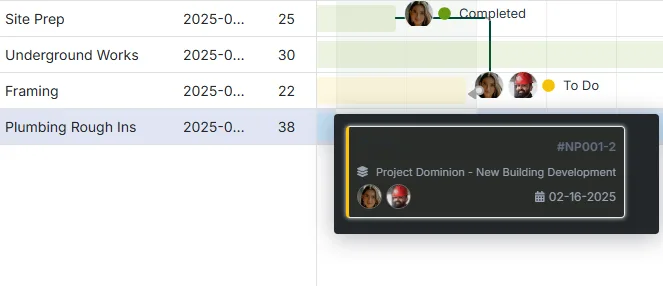
Access all project details, schedules, and budgets from one location, providing visibility for streamlined coordination across teams.

mail

Real-Time Updates

Monitor project progress with real-time updates, enabling quick adjustments and keeping all stakeholders informed.

gantt-detail

Efficient Scheduling and Resource Allocation

Strong scheduling brings order to busy project sites. Teams handle many moving parts, so they need clear plans and steady timing. Good tools help managers assign people, track equipment, and adjust workloads without slowing down the day. This structure keeps every task in the right place and supports quick decisions when plans shift. Workflows stay simple because each update reaches the crew on time. Many builders use scheduling software that construction industry employees trust. It keeps schedules tight and helps everyone understand their role. This saves time and reduces confusion. Additionally, it supports smooth progress from start to finish.

Why Construction Scheduling Software is Better for Every Project

Good scheduling keeps every project steady and clear. Workers perform better when they follow a plan. The plan outlines tasks, timelines, and daily goals. Strong tools support managers who want tighter control and fewer delays. Each step stays simple because every update reaches the right person fast. Many builders rely on the best scheduling software for construction to keep time and tasks in sync.

gantt-detail

Keep All Your Projects On Track

Strong project control keeps every working crew step clear. Managers use construction project management software to track jobs, assign tasks, and follow daily progress without missing details. This structure helps crews stay aligned because each update reaches the right person at the right time.

Smooth progress depends on clear tasks, and construction task management software gives teams that clarity. Workers see their duties, deadlines stay organized, and each part of the project moves forward without confusion.

Task Management

Organize and assign tasks across teams, ensuring responsibilities are clear and deadlines are met efficiently.

Document Management

Store and share critical documents, designs, and permits in a central location so everyone has access to the latest information.

Job Cost vs. Revenue

Evaluate revenue versus expenses to maximize profitability across all your projects and maintain financial oversight.

Enhanced Team Collaboration and Communication

Professionals communicate better when they share updates in one place. In-app messages, task notes, and quick alerts help every worker understand changes without delay. Many organizations choose free construction project scheduling software because they want simple tracking without extra steps. These tools support smooth planning and steady teamwork. Strong features in scheduling software construction industry systems help every crew stay informed, move faster, and keep daily work aligned.

grouping

In-App Messaging

Allow team members to communicate directly within the platform, enabling quick updates and collaboration.

toggle

Task Notes and Updates

Add notes to tasks for better context, helping team members understand project-specific requirements.

share

Real-Time Notifications

Receive alerts on task completions, material updates, and schedule adjustments to keep everyone informed.

Budgeting and Job Cost Tracking

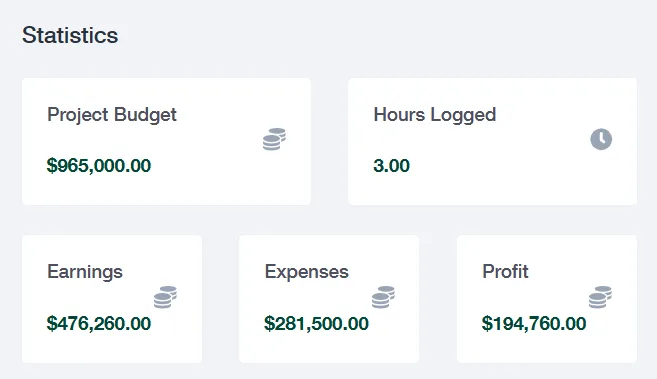
WorkCase helps monitor expenses with job costing tools that track labor, materials, and overhead to keep budgets on target. By comparing actual costs to initial estimates, project managers make informed decisions to maintain project profitability.

stats

scheduling software construction industry Reporting and Analytics

WorkCase’s scheduling software construction industry provide insights into project performance, helping to improve planning for future projects. Track metrics like cost efficiency, task completion rates, and project timelines for data-driven decisions.

speed-2

Project Efficiency Reports

Analyze productivity, resource usage, and timelines to ensure projects run efficiently.

check

Budget Reports

Monitor cost metrics to identify savings opportunities and maintain financial alignment with project goals.

secure

Customized Dashboards

Set up dashboards focused on the most relevant metrics, ensuring clear visibility into key areas.

Benefits of Using best scheduling software for construction

Work Case simplifies planning and keeps projects on track. Crews coordinate tasks and timelines without confusion. Managers save time while crews stay informed. Tools help track resources, assign work, and update progress instantly.  Companies trust construction project management software options for steady control and smooth daily operations. Clear schedules reduce mistakes and make every project easier to manage.

Reduce downtime and delays

The working crew can see all tasks in one place. WorkCase helps crews avoid waiting for updates or resources.

Improve alignment across field and office teams

Field workers and office managers stay synced. Everyone knows tasks and deadlines at all times.

Automate schedule updates

Changes in one task reflect across the schedule automatically. Updates reach all relevant members instantly.

Increase labor and equipment efficiency

Crews assign the right people and tools to each task. Resources get used without waste.

Avoid overbooking or double scheduling

The system prevents overlapping tasks. Each resource and crew has a clear plan without conflicts.

Strengthen cost control and forecasting

Managers track expenses against tasks easily with construction project scheduling software free. Accurate schedules help predict costs and prevent overruns.

construction project scheduling software — FAQs

Plan, execute, and close out construction projects in one system. Structure phases and milestones, coordinate crews and subs, track costs against budget, and keep RFIs, submittals, and field reports organized—so schedules hold and margins stay protected.

Break work into phases/WBS, set milestones, add task dependencies, assign resources, and visualize timelines in Gantt; switch to Kanban for day-to-day execution and reprioritization.

Build a budget from estimates and cost codes; actuals flow from time, materials, equipment, and subs. See real-time budget vs. actuals, variance, and forecast-to-complete to spot overruns early.

Yes—create RFIs, route submittal packages, track drawing/spec revisions, capture approvals, and maintain a full audit trail so the field always works from the latest documents.

Convert plans into work orders and checklists, log daily reports (work performed, headcount, delays), attach photos/files, manage inspections and punch lists, and use safety/QA forms—online or offline.

Bill T&M or progress draws with schedule of values and retainage/holdbacks; change orders roll into budgets and invoices, and AR visibility (draft/sent/paid/overdue) keeps cash flow clear.